Showing posts with label Semi Untethered. Show all posts

Sunday, June 17, 2012

How To Upgrade/Update Cydia Themes, Apps and Tweaks (iPod Touch, iPhone, iPad)?


Whenever there is an update of a theme, tweak or app in Cydia, it appears under the Changes option of the screen. Below is the detailed steps on how to update to the latest version of any app, tweaks and themes in Cydia.


Note: Your device must be jailbroken and has Cydia on it.


Step 1. Open Cydia. Wait for the updates to be downloaded (these are seen at the top part of the Cydia screen.)
Step 2. Taps Changes option at the bottom of the screen.
Step 3. You can either select one by one to upgrade or Tap the Upgrade(3) at the top-left of the screen.
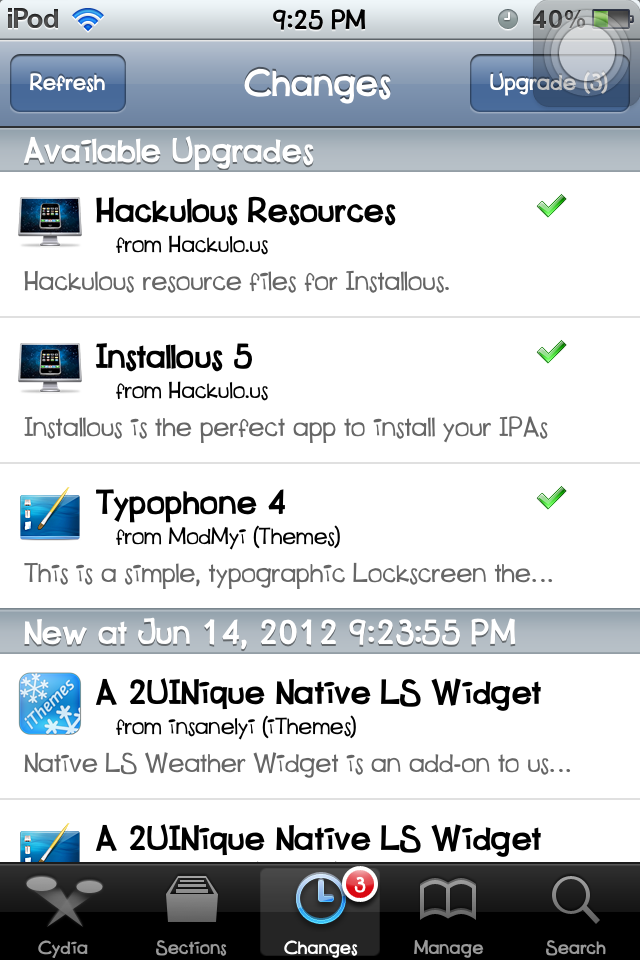


Step 4. Wait for the download and upgrade to finish. Tap Return To Cydia.


Your apps, tweaks and themes are already upgraded to their latest versions.


Good luck and enjoy! :)


Related Posts:
List of Cool and Useful Cydia Apps, Themes and Tweaks
See All Typophone Tweaks and Tricks
How To Move the Notifications Below the Date?

How To Move the Notifications Below the Status Bar?

How To Change The Wallpaper  of the Latest Typophone 4?

Tuesday, May 1, 2012

How To Update/Upgrade iPod, iPhone, iPad to iOS 5.1 using iTunes

 
This is the latest iOS release of Apple. Below are the steps to update to this latest version.


Requirements:

1. The device you want to update of course
2. iTunes (Latest Version 10.6)
3. USB Cable Connector

Steps:

1. Open iTunes.
2. Connect the device.
3. Back it up. To back up, right-click your device located at the left side of iTunes window then select Back Up. This is done to prevent the loss of your data if something goes wrong and also this back up will be used later for restoring.
4. Select your device again.
5. The Summary of your device should appear. Click Update.
6. If you have not yet downloaded the firmware (iOS 5.1), click Download and Update, if you have, click Update.
7. Wait for iTunes to do its thing (such as verify the software, back up, update then restore).

After that, you already have the latest iOS in your device. Good luck and enjoy! :)
For any problems, just comment.