Showing posts with label BigBoss. Show all posts

Thursday, August 16, 2012

How To Move The Position of the Notifications In Prestige HD Theme At The Bottom of the Date (iPod Touch, iPhone, iPad) ?


Make your notifications appear right under the status bar! Below are the detailed procedure to do that to your Prestige HD Theme also. 


If you enable your notifications to appear in the Lockscreen, it usually appears right below the date like this below or a little below more.


However, if you want it to appear just below the status bar like that above, just follow the simple steps below.

What you need:
1. Jailbroken device
2. Prestige HD from Cydia (Learn to get Prestige HD here)
3. Browser for your device or OpenSSH and Cyberduck
4. This modified, BarLCD@2x~iphone.png file. Click the transparent image below and then save it to your computer. It is pretty hard to click the image since it is very small, just move around your cursor until it changes.

BarLCD@2x~iphone.png image 320x1 pixel
This image is intended to be transparent


Step 1: Plug in your device.
Step 2: Open your Apple device browser.
Step 3. Navigate to /private/var/stash/Themes.<random code>/Prestige-HD.theme/Bundles/com.apple.TelephonyUI
Step 4. Back-up the contents of the folder by selecting all, right-click then Save As.
Step 5. Delete BarLCD@2x.png. Copy BarLCD@2x~iphone.png to the folder.
Step 6. Respring.

You can already see that the notifications appear right below the status bar.

Good luck and enjoy! For any further questions or if it doesn't work for you right, just put up a comment below. :)

Monday, August 13, 2012

How To Get The Original Default Typophone 4 Blue Drop Background?

Here's the default blue drop on blue background of the old versions of Typophone 4 Lockscreen Theme. Save it to your device and choose it as your lockscreen wallpaper if you might. :)

640 x 960 pixels

Saturday, August 11, 2012

How To Get Prestige HD Weather Time Date for Prestige HD Lockscreen for Free (iPod Touch, iPhone, iPad)?


Prestige HD Weather Date Time is a theme from Cydia that adds the weather, date and time to your Prestige HD theme. 

Below is the screenshot of the Prestige HD Weather-Date-Time Lockscreen.

Note: Your device must be jailbroken and has Cydia and Winterboard (Get Winterboard here) on it to get this theme.


Steps:

1. Launch Cydia. Wait for it to update.

2. Tap Search at the bottom of the screen. Search for "Prestige", then look for Prestige-WeatherTimeDate.


3. Select it, Install then Confirm.

4. Wait for the download and installation to finish and then tap Return to Cydia.

5. Exit Cydia. Launch Winterboard. Notice that there are various added themes in the list besides Prestige-Widget-WTD SB. Make sure that Prestige -Widget-WTD SB  is the one that's ticked. If not, tap it to tick.


6. Tap Winterboard to go back, then ReSpring (What is ReSpring?).

Good luck and enjoy your new theme! ♥
Do make a comment if you encountered any problems.

Friday, August 10, 2012

How to get Prestige HD Theme for Free Using Cydia (iPod Touch, iPad, iPhone)?

Prestige HD is a theme from Cydia that features a sleek grayish look and feel for your device's interface. It comes with a cool icon pack, nice lockscreen slider, and unique design for selected apps' interfaces. Below are screenshots of this theme.

Tweaks and other modifications can also be made to this theme to make it look more cool and make it more useful and productive.

Note: Your device must be jailbroken and has Cydia and Winterboard (Get Winterboard here) on it to get this theme.


Screenshots:

Lockscreen

Lockscreen Notifications

Charging

Passcode Interface

iMessage Design

Some of the icons the Prestige HD offers

iCal

Calculator
Steps:

Step 1: Launch Cydia. Wait for it to update. The free Prestige HD Theme is available on the following repositories, enclosed in parentheses is the repo url:
            HackYouriPhone (http://repo.hackyouriphone.org/)
            xSellize(http://cydia.xsellize.com/)
            Insanelyi

If you already have one of these repos or have all of them, skip Step1.1 to Step 1.3.

     Step 1.1: Tap Manage at the bottom, then Sources. 
     Step 1.2: Tap Edit, then Add.
     Step 1.3: Enter the url repo listed above, select Add Anyway when a pop up appears. Wait for the repository to load.

Step 2: Tap Search at the bottom, then search for Prestige HD or go to one of the sources and look for Prestige HD. (I used the one from HackYouriPhone repo since the one from xSellize gives me the Hatch Sum Mismatch Error)


Step 3: Tap Install, then Confirm.


Step 4: Wait for the download and installation to finish.

Step 5: To use the theme, exit Cydia, launch Winterboard.

Step 6: Tap Select Themes, make sure Prestige HD is ticked. If not, tap it to tick.


Step 7: Tap Back at the top part then ReSpring (What is ReSpring?).

Enjoy and good luck! Let me know if there are problems. :)

Tuesday, May 29, 2012

How To Hide Your Springboard Icons Using A Cydia App: Poof (iPod Touch, iPhone, iPad )?

Note: Your device MUST BE JAILBROKEN and HAS CYDIA ON IT.

Poof is an Cydia app that enables the users of the device to hide the icons in the Springboard (What is Springboard?). It somehow makes them invisible, the only way to access them is to search them through the Spotlight Search or unhide them using the same app - Poof. Below are the steps to install Poof.


Step 1. Open Cydia.


Step 2. Go to Search options and search for Poof. It is under BigBoss repository.
Step 3. Select Poof.


Step 4. Install then Confirm.
Step 5. Wait for the download ans installation to finish.


Step 6. After that, you should already see Poof icon in your springboard.


Here's how to hide the icons.

Step 7. Open Poof. Wait for it to enumerate the applications.
Step 8. Toggle to Off to hide icons.


Step 9. Respring(What is Respring?) . If you don't resping, the icons will remain in your springboard (How to Respring?).

Goodluck and enjoy! :)

Thursday, November 24, 2011

List of Cool and Useful Cydia Apps, Tweaks, Themes and Add Ons

This is not arranged in a specific order. These apps, tweaks, themes and add ons are more or less helped improves the usefulness and coolness of the device.

Note: Your device must be jailbroken and has Cydia on it.

1. Winterboard

This app is used to select the themes and other tweaks that you want to apply on your device.


2. Installous
This app is used to browse and install third-party and cracked paid apps.


3. BytaFont
An app used to browse ans install different fonts. This app is also used to set and change the font of your device's default installed fonts.


4. iFile
This app is used to explore hidden files of your device. There is also a built in text editor in this app in which you can use to edit codes with such as css files.


5. MyTube
    You can download videos in your device with this app.

6. PopPod
   This is a pop up controller for your music. The trigger to make this appear can be customized. This makes your Music very very accessible. It has play, previous, next and volume controllers. It even displays the album art and lyrics!

7. ScrollingBoard
    
8. iGotYa
This app can take a snapshot of anyone who tries to unlock your device and fails. Provided, your device has a security lock. After taking a shot, it will automatically send the image to your provided email. The downside however is when  you are in place where not everywhere has a WiFi  thus, it cannot send the picture of the "curious one".


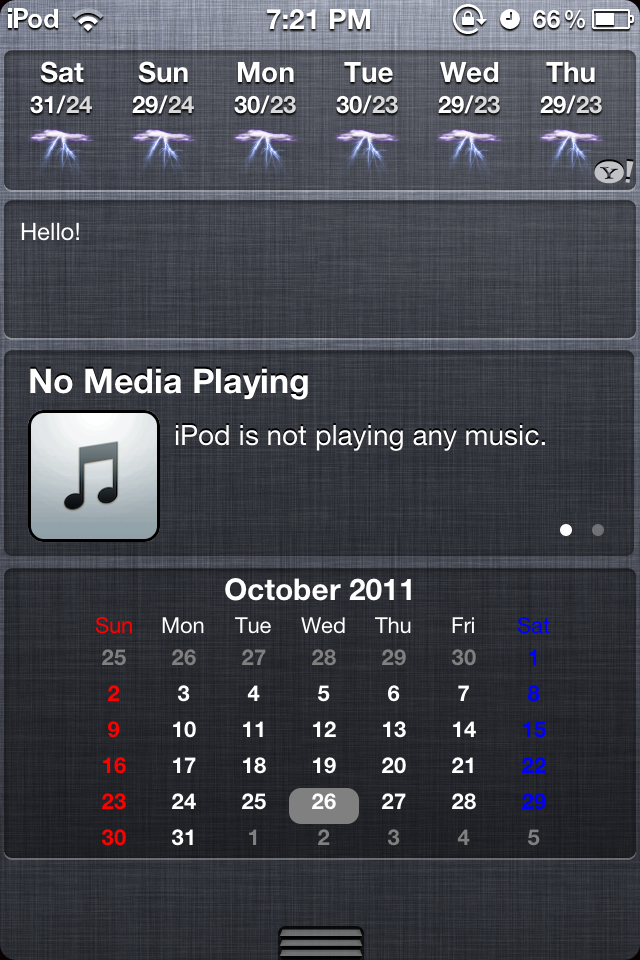
9. Calendar Widget for Notification Centre (Add On)
    This is an add on from Cydia that adds a full blown Calendar to your Notification Centre.

10. Music Center Widget for Notification Centre (Add On)
    This is an add on from Cydia that adds a control for your music to your Notification Centre.

11.QuickNote Widget for Notification Centre (Add On)
    This is an add on from Cydia that adds a Quick Note to your Notification Centre. You can already take notes immediately just by going to the Notification Centre.

12. AppsCenter Widget for Notification Center (Add On)

13. Barrel
The best transition tweak from Cydia. Enjoy the different effects offered by this app that replaces the boring slide effect when transitioning from page to page.


14. Typophone 4
     A very sleek theme for your device with a different lock screen feel.

15. Bigify+
Make your app icons bigger by this tweak. Additionally, you can rotate the icons, change the color, hide icon labels, make them transparent and flip badges based on your preference.


16. Color Keyboard

17. NotificationCenter Enhancer for Notification Centre (Add On)

18. Poof!


Make your apps invisible with this app from Cydia. Available in hackyouriphone repository.


19. Dreamboard
Transform your device's feel with this app. You can apply different themes that not just change the color and background but almost all the components of the system. The usual SpringBoard will be replaced by different interfaces like of that Windows 7, MacOSX Lion, Android etc.

Wednesday, October 26, 2011

How to Get Calendar Widget for Your Notification Center (iPhone, iPod Touch, iPad)?

Calendar for Notification Center is an add on that enables you to have and view your calendar from the notification center. To acquire this add on, your device must be running on iOS 5 and jailbroken first. These are the steps to get Calendar for Notification Center.


1. Update to the latest iOS (5.0). Learn here how.
2. Jailbreak your device using redsn0w. Learn here how.
3. Open Cydia.
4. Proceed to the Search option. Search for Calendar and look for Calendar for Notification Center. Also, you can go to Manage > Sources > BigBoss repo and look for Calendar for Notification Center and then select it.
5. Install and Confirm.
6. After the installation, select Restart SpringBoard.
7. Go to settings, add Calendar Widget in the Notification Centre.

Enjoy your new add on! :)

Monday, October 24, 2011

How to get Barrel Tweak for Free Using Cydia

Barrel is a tweak which enables you to change the effect when you swipe between screen on your SpringBoard (What is SpringBoard?). It is from BigBoss repo but it it not free. This is also iOS 5 compatible. However, in this tutorial, you can get this very cool app for free. Let's get started.

1. Open Cydia. If you don't have Cydia, you have to jailbreak first your device. Learn here how.
2. Go to Manage option at the bottom and then Sources.
3. Select Edit then Add.
4. Add http://cydia.xsellize.com in your Sources.
5. Go to the Search option at the bottom. Search for Barrel and then select it.


6. Install and wait for it to finish.
7. Go to Settings and look for Barrel.
8. You can now see different effects and start trying them.