
This app is used to remove the annoying sound charge sound on your iOS device. You need Winterboard to use this app.
For other Themes, Tweaks and Cydia Apps, PROCEED HERE
Step 1. Open Cydia.

Step 2. Go to the Search option and search for Silent Charge Classic.

Step 3. Select that and tap Install, then Confirm.


Step 4. Wait for the download and installation to finish.

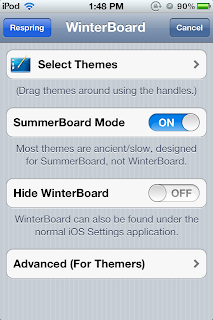
Step 5. Exit Cydia and proceed to Winterboard.

Step 6. Go to Select Themes. Tick Silent Charge Classic.

Step 7. Respring.
You can now plug in your device for charging and you won't hear a charging sound.
Good luck and enjoy! :)
For further questions, just comment below.
For other Themes, Tweaks and Cydia Apps, PROCEED HERE
For other Themes, Tweaks and Cydia Apps, PROCEED HERE
Step 1. Open Cydia.

Step 2. Go to the Search option and search for Silent Charge Classic.

Step 3. Select that and tap Install, then Confirm.


Step 4. Wait for the download and installation to finish.

Step 5. Exit Cydia and proceed to Winterboard.

Step 6. Go to Select Themes. Tick Silent Charge Classic.

Step 7. Respring.

You can now plug in your device for charging and you won't hear a charging sound.
Good luck and enjoy! :)
For further questions, just comment below.
For other Themes, Tweaks and Cydia Apps, PROCEED HERE


 Posts
Posts


