Tuesday, July 9, 2013

How To Eat An Onigiri From A Japanese Convinience Store?


When you go to Japan, it seems that everyone is on hurry. And by that comes food in which you can eat in hurry, especially when you are on sightseeing and you want to maximize every second of your trip.

Worry no more because Japan has lot to offer when it comes to instant foods. Every block, you can spot a convinience store called "combini" in Japanese in where you can buy from chips to rice meals.

One of the most popular food in Japan is the Onigiri. They even have a special lunch bag shaped just for this meal. It is a rice shaped like a triangle with different viands inside it. It is wrapped in seaweed and then sealed by a plastic.

It is a little confusing on how to open it in a way that you dont mess up the seaweed wrapping around it. Instructions are written below.


But for further demo, here's how:

1. Peel of the part where number "1" is written. Usually, it is the top part.


2. Go all the way down and around the back until you peel off a strip in the middle part.


3. Pull off the sides labeled "2" and "3".


4. Take a bite and enjoy! I recommed Tuna Mayo Onigiri! :)

Sunday, April 28, 2013

How to Buy Candy Crush Inapp Purchases (Boosters, Charms, Tickets, Life) for Free? (iPhone, iPod Touch, iPad)

Crazy for Candy Crush? Don't want to wait for friends for a life, extra moves or a ticket? This will be the trick just right for you! Learn how to buy inapp purchases like boosters, charms, life, and tickets below for free. Oh yes, you heard that just right, for FREE! :)

Note: This is only suitable for jailbroken Apple devices.


What you need:
1. Your device, of course. MUST be jailbroken and has Cydia on it.
2. SBSettings is already installed in your device. Get SBSettings here.

Procedure
1. Launch Cydia.

2. Go to Manage option at the bottom part, then Sources.


3. Tap Edit, then Add. A pop up box will appear asking for a source. Add these following sources:
  • Hack Your iPhone - http://repo.hackyouriphone.org/
  • Alex793perso - http://itiaprepo.com/alex793/


4. Search for IAP Free, and install it.

 5. Once successfully installed, search for IAP Core Plugin and install this again.


6. Activate SBSettings. Go to Mobile Substrate Addons, then look for IAP Free and IAP Core Plugin. Make sure they are both on. Open the IAP Free Icon in your device and check if the Core Plugin is installed.


7. Reboot your device if neccessary.

8. Launch Candy Crush Saga, proceed to Yeti Shop to test your hack. Coohose a booster, purchase and tada! You can now have whatever you want!


Note: As far as I've tried, this also works for Temple Run, Temple Run Brave, 4 Pics 1 Word, and Infinity Blade.

Wednesday, March 20, 2013

How To Set Up New iPod Touch, iPhone, iPad in iOS6?


This tutorial is suitable for new Apple users or if you have just updated to iOS 5 because frequent Apple users are most likely used to setting up their devices, I presume? :)

Since iOS 5, you can now set up your device even without iTunes. To do this, you just need a charged device and ideally an internet connection for configuring other stuffs like Apple ID.

Please follow the procedure below to set up.

Note: The device I used is iPod Touch 5 but the procedure below is almost for all Apple devices.


1. Power on your device by pressing the button located on the top of the device.

2. Unlock the device by sliding the arrow icon to the right.
3.  Select you Language, and your Country.


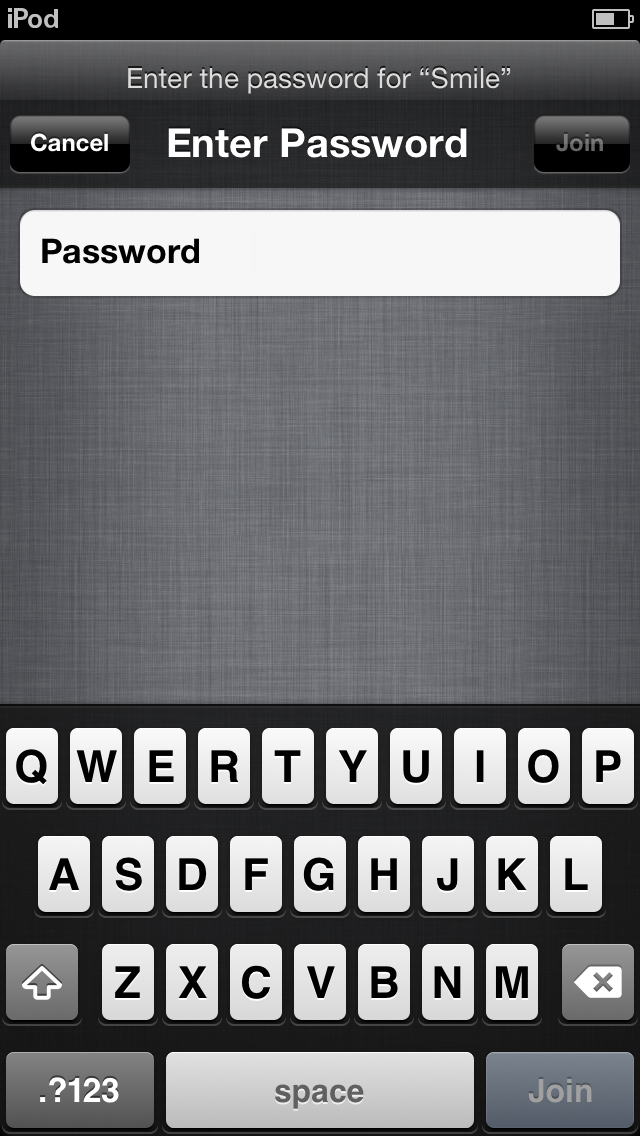
4. Choose your connection and enter your password.


 5. Enable/Disable Location Services if you want your location to be determined.

6.  Set up a new iPod Touch or Restore from an existing back-up.
 7. Enter your Apple ID if you have an existing one, Sign up for a new Apple ID or jsut skip this step.


 8. Agree to the Terms and Conditions to continue.


 9.  Set up other settings such as iCloud, Find my iPod (I recommend this one), and Diagnostics.


10. Register your device.


11. Finally, Start using your device! :)


Monday, February 11, 2013

How To Add Back Instagram To Twitter Image Preview in Mozilla Firefox?


1. Open Mozilla Firefox v18.0.2.
2. Go to the Firefox Menu > Addons.
3. Go the Get Addons tab. There are many available addons that adds back Instagram to Twitter. Choose one then click Install. Restart the browser if needed.

4. You can now view Instagram photos directly from Twitter.

Good luck and enjoy! ♥

Sunday, January 20, 2013

How To Pay Bills Through Personal Metrobank Direct?


Below are the steps on how to pay your bills online using Metrobank Direct. This waorks if you have an existing account in Metrobank and have already applied for a Metrobank Direct account. In my case, I am using my Metrobank payroll account to pay my bills such as Femme Visa credit card and broadband.

Step 1. Go to https://personal.metrobankdirect.com/
Step 2. Log in using the username ebanking@metrobank.com.ph emailed and the password mailer the bank branch gave you.
Step 3. Go to the Pay Bills link at the left side.


Step 3
. Enter the institution/company you want to send the payment to, 
account number (not your Metrobank account but the account number for that company, e.g. account number in Globe, credit card number), and the amount you wish to pay. Reference No. is not required even though there is an asterisk beside that field.Step 4. Click Continue. Make sure all the information are correct before proceeding.


Step 5. Click Confirm if you are sure about all the information.
Step 6. Congratulations! You have now paid your bills online! You can hit Print if you want a copy of the transaction receipt.
Good luck and enjoy! :)

Monday, January 7, 2013

How To Commute To Laguna From EDSA Using Public Tranport (Bus)?


There are numerous bus terminals in EDSA that can take you to Laguna. This post is specifically for commuters who would like to go to Calamba, Laguna or to Pansol, Laguna.

From EDSA, ride a bus bearing Calamba, Lucena, Lipa, or Batangas signboard. You can opt to ride a bus parked inside a terminal which waits for passengers or just wait by the side of the highway and hail one. Once inside, tell the conductor, you wish to be dropped by Turbina.

Upon reaching Turbina, cross the road to ride a jeepney bearing SM Calamba/Crossing signboard. You can ask the driver to drop you off at SM Calamba since it is the most known and safest place for tourist to start with.

There are many tricycles parked there that can take you to famous locations in the place (Rizal's Residence, Pasol Hot Springs). The fare is only P20 minimum if I am not mistaken.

Enjoy the travel and adventure! :)

How To Sign Up An Apple ID With Free Option as Payment Method Using Your Device?


Note: Make sure you still don't have an existing Apple ID.

1. Launch AppStore in iTunes.
2. Select one FREE app.
3. Select Install.
4. A form will appear telling you that you don't have an existing Apple ID, proceed to signing up.
5. In the Payment Methods, along with the credit card options, there should be a free (None) option. Select that and continue.
6. You now have an Apple ID with free as payment method.

Goodluck and enjoy! :)